
The dbt Semantic Layer: How MetricFlow Turns Business Logic Into Infrastructure
The dbt semantic layer with MetricFlow lets data teams define business metrics as code. Those definitions flow to any BI tool, AI agent, or analytics platform through a single governed interface.
Talk to an expertThe dbt semantic layer is where most modern data teams should define their business logic. Not in a BI tool. Not in a spreadsheet. In the same version-controlled, tested codebase that builds the data warehouse. MetricFlow, the engine powering the dbt semantic layer, lets teams define metrics, dimensions, and relationships as code. Those definitions then flow to any connected BI tool, AI agent, or analytics platform through a single governed interface.
This matters because the semantic layer has historically been locked inside individual tools. Looker had LookML. Power BI had its tabular model. Tableau had data sources. Each one defined business logic, but only for its own consumption. dbt moves the semantic layer out of the BI tool and into the transformation layer, making it portable, testable, and vendor-neutral.
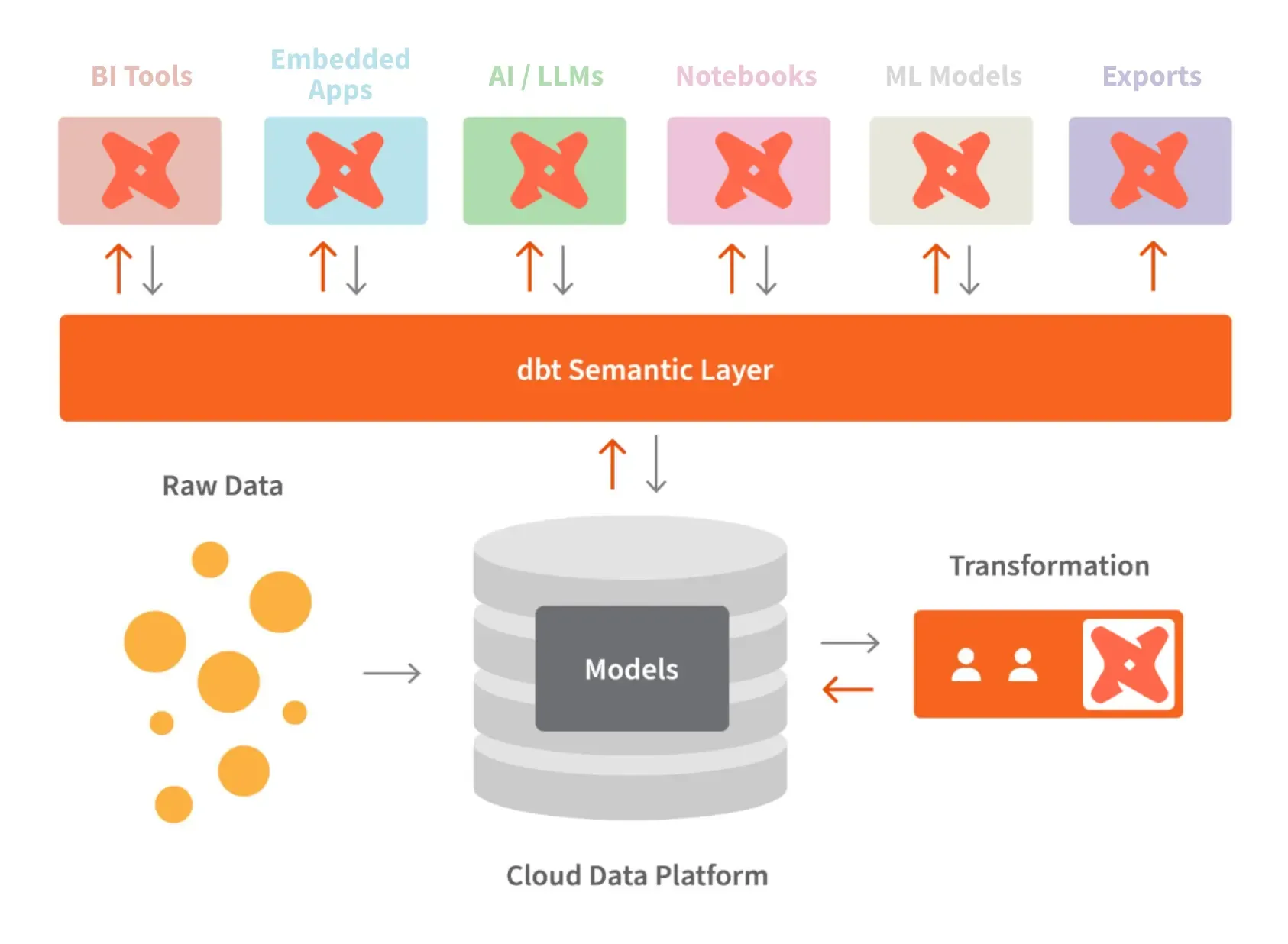
What the dbt semantic layer actually is
The dbt semantic layer is a framework for defining business metrics as code using MetricFlow. It sits inside your dbt project alongside your transformation models. Instead of defining "revenue" inside a BI dashboard configuration, you define it in a YAML file that gets version-controlled, code-reviewed, and tested like any other piece of data infrastructure.
MetricFlow is the query generation engine underneath. It does not store or compute data. It translates metric requests into optimized SQL that executes on your existing data warehouse. When a BI tool or AI agent asks "what was revenue last quarter by region," MetricFlow generates the correct SQL with the right joins, filters, and aggregations based on your declared definitions.
The core building blocks are:
Semantic models. These map your dbt models to business entities. A semantic model defines which columns are dimensions (attributes for grouping), which are measures (aggregations), and which are time dimensions (for time-series analysis).
Metrics. These are the business calculations your organization cares about. Revenue, churn rate, customer lifetime value, average order value. MetricFlow supports simple metrics (single measure), derived metrics (calculations on other metrics), ratio metrics, and cumulative metrics. Each one is defined once and used everywhere.
Relationships. These declare how semantic models connect. Customer joins to Order through customer_id. Product joins to Line Item through product_id. Declared relationships prevent AI agents and BI tools from guessing how tables should be joined.
Saved queries. Pre-defined query patterns that combine metrics, dimensions, and filters for common use cases. These serve as governed templates that teams can consume without building queries from scratch.
Why metrics belong in the transformation layer
The traditional approach puts business logic in the BI tool. An analyst creates a calculation in Looker, Tableau, or Power BI. That calculation lives inside the tool's configuration. When a second team needs the same metric in a different tool, they rebuild it from scratch. When an AI agent needs it, there is no accessible definition at all.
Moving metrics to the transformation layer solves three problems at once.
Version control. Metric definitions in dbt live in Git. Every change is tracked, reviewed, and auditable. When someone modifies the revenue calculation, the pull request shows exactly what changed and why. This is impossible when metrics live inside a BI tool's point-and-click interface.
Testing. dbt tests validate that your metric definitions produce expected results. You can assert that revenue is never negative, that customer counts match between tables, or that time-series metrics produce complete date spines. Business logic gets the same quality assurance as your data pipelines.
Portability. MetricFlow definitions are not locked to any BI tool. They flow to Tableau, Power BI, Looker, Omni, ThoughtSpot, Sigma, Google Sheets, and any tool that connects through the dbt semantic layer APIs. One definition. Every consumer. dbt Labs has also open-sourced MetricFlow and committed to the Open Semantic Interchange (OSI) standard, making these definitions portable beyond the dbt ecosystem entirely.
How dbt connects to BI tools through the semantic layer
The dbt semantic layer exposes metrics through three interfaces: a REST API, a GraphQL API, and a SQL interface. Any tool that speaks one of these protocols can query metrics directly without writing warehouse SQL.
In practice, this means:
Tableau and Power BI connect through the SQL interface. Analysts see governed metrics as queryable dimensions and measures. They build dashboards using the same definitions that data engineers maintain in dbt, without needing to understand the underlying table structure.
Omni and ThoughtSpot have deeper integrations as OSI partners. These tools can import dbt semantic layer definitions natively, creating a seamless experience where the metric catalog in the BI tool is automatically synchronized with the dbt project.
Google Sheets connects through the REST API for ad-hoc analysis. Finance teams can pull governed metrics into spreadsheets without writing SQL or risking inconsistent calculations. This addresses one of the most common requests in the Search Console data: teams want to sync dbt semantic layer metrics to Sheets for quick analysis.
AI agents consume the semantic layer through MCP (Model Context Protocol) or direct API calls. The agent reads the metric catalog to understand what metrics exist, how they're calculated, and which dimensions are available. This eliminates the hallucination problem where agents guess at business logic from column names.
MetricFlow vs warehouse-native semantic layers
Snowflake Semantic Views, Databricks Metric Views, and BigQuery's metadata services all offer semantic capabilities built into the warehouse. These are powerful, but they serve a different purpose than MetricFlow.
Warehouse-native semantic layers are optimized for consumption within that specific platform. Snowflake Semantic Views compile into Snowflake SQL. They are fast, deeply integrated, and benefit from platform-specific optimizations like caching and access control. Snowflake's Semantic View Autopilot can even auto-generate definitions from existing table metadata, cutting creation time from days to minutes.
MetricFlow is warehouse-agnostic. Your metric definitions live in your dbt project and compile to whatever warehouse you use. If you migrate from Snowflake to BigQuery, your semantic layer moves with you. If you run a multi-warehouse architecture, your metrics are consistent across all of them.
The best approach for most teams is to use both. Define your metrics in dbt with MetricFlow for portability and version control. Export them to OSI format. Let your warehouse's native semantic layer consume those definitions for platform-optimized performance. Snowflake's Horizon Catalog already supports this pattern, and Databricks Unity Catalog is moving in the same direction.
This is not an either-or decision. It is a layered architecture where dbt provides the source of truth and the warehouse provides the execution engine.
Getting started with the dbt semantic layer
If you already use dbt for transformations, adding the semantic layer is an incremental step, not a rebuild.
Start with your top 20 metrics. Identify the metrics your leadership team uses to make decisions. Revenue, customer count, churn, conversion rate, average order value. Define these in MetricFlow first. This covers 80% of what people and AI agents will ask about.
Map your existing models to semantic models. Your dbt models already represent business entities. Customer, Order, Product, Subscription. Create semantic model YAML files that declare which columns are dimensions, measures, and time dimensions. MetricFlow builds on what you already have.
Declare relationships explicitly. The join paths between your semantic models are critical. Without declared relationships, BI tools and AI agents guess how tables connect. With them, every query follows the correct join logic automatically.
Connect one BI tool first. Pick the tool most of your analysts use daily. Configure the dbt semantic layer connection. Validate that the metrics in the BI tool match the definitions in your dbt project. Once one tool is working, adding more is straightforward because the definitions are centralized.
Export to OSI for future-proofing. Even if you only use one BI tool today, exporting your definitions to OSI format ensures they're portable. When your organization adds a second BI tool, switches platforms, or deploys AI agents, the definitions travel with you.
Where this is heading
dbt Fusion, the next-generation dbt engine written in Rust, parses large dbt projects in milliseconds instead of minutes. This speed matters for the semantic layer because metric definitions need to compile and validate in real time as teams iterate. Fusion support is expanding across Snowflake, Databricks, BigQuery, and Microsoft Fabric through Q2 2026.
The OSI specification is targeting native support in 50+ platforms by end of 2026. dbt Labs is a founding partner. MetricFlow definitions that export to OSI today will be consumable by an increasingly wide ecosystem of tools and agents.
Gartner predicts that universal semantic layers will be critical infrastructure by 2030, on the same level as cybersecurity and data platforms. The dbt semantic layer with MetricFlow is the most practical path to get there for teams already investing in analytics engineering.
Also make sure to check out our semantic layer page
For every dollar spent on AI, six should go to data architecture. The dbt semantic layer is where those dollars turn into governed, testable, portable business logic that every tool and agent in your stack can trust.
Deep dives on modern data engineering
Semantic layers, modern stacks, and scalable architecture — in your inbox, not in a backlog.
Unwind Data
Speak with a data expert
We've helped scale-ups and enterprises move faster on exactly this kind of work — without the trial and error. Strategy, architecture, and hands-on delivery.
Schedule a consultation