
Snowflake Semantic Views: The Practitioner's Guide to Setup, Autopilot, and Best Practices
Snowflake Semantic Views are now the native semantic layer inside Snowflake, powering Cortex Analyst, AI agents, and BI tools from a single governed definition. Here is how to implement them correctly — including Autopilot, dbt integration, and the best practices that matter in production.
Talk to an expertOn February 3, 2026, Snowflake moved Semantic View Autopilot to general availability. That date matters because it marks when Snowflake Semantic Views stopped being a preview feature worth watching and became a production tool worth implementing.
If your organization runs Snowflake and is serious about AI analytics, Snowflake Semantic Views are now the most direct path to a governed semantic layer inside your existing stack. No additional infrastructure. No separate service to run. No vendor selection process. The semantic layer lives in the same schema as the data it describes, governed by the same access controls, versioned like any other database object.
This guide covers what Snowflake Semantic Views actually are, how Autopilot works in practice, and the best practices that separate implementations that hold up in production from ones that break in the first month.
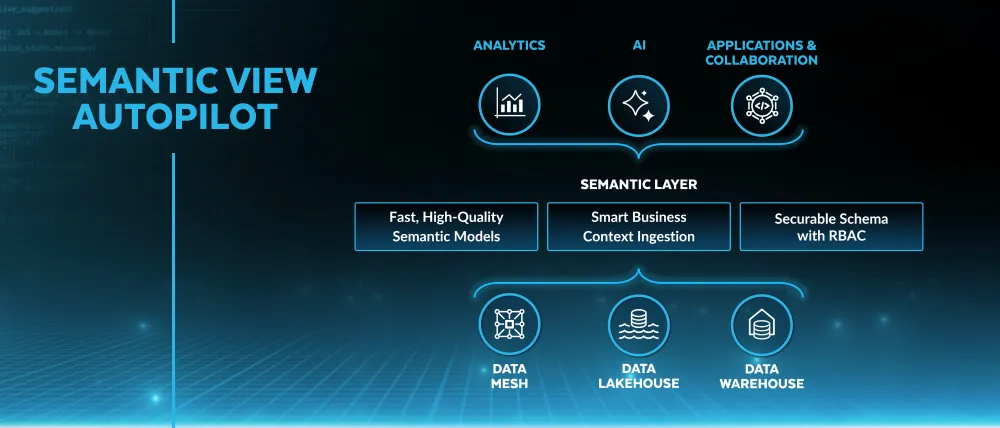
What a Snowflake Semantic View Actually Is
A Snowflake Semantic View is a schema-level database object that defines business logic on top of physical tables. It is not a query. It is not a materialized view. It is metadata: a structured definition of how your business thinks about data.
The distinction from a regular view matters. A regular SQL view encapsulates a query. When someone runs it, they get back the result of that query. A Semantic View encapsulates meaning: which tables exist, how they relate, what the metrics are, what the dimensions are, what synonyms map colloquial business terms to physical column names, and how Cortex Analyst should interpret natural language questions about this data.
Before Semantic Views, Snowflake stored this metadata in YAML files on a Snowflake stage — accessible to Cortex Analyst but sitting outside the database's normal governance model. No role-based access control. No time travel. No replication. No audit trail. Many teams found this uncomfortable, especially in regulated industries where every object needs to be securable and auditable.
Semantic Views solve this by treating the semantic model as a first-class database citizen. You grant SELECT on a Semantic View the same way you grant SELECT on a table. You replicate it across regions the same way you replicate tables. You query it directly with standard SQL. And you use it as the grounding layer for Cortex Analyst, Cortex Agents, and any BI tool that connects to Snowflake.
The Core Components of a Semantic View
A Snowflake Semantic View is defined by five components. Understanding each one before you build is the difference between a semantic layer that answers questions reliably and one that confuses Cortex Analyst as often as it helps it.
Tables and relationships. The physical objects the Semantic View covers, and how they join. Snowflake recommends a star schema: fact tables with primary keys, dimension tables with foreign keys, clean join paths. One-to-many relationships defined explicitly. Many-to-many handled carefully, because they complicate metric aggregation in ways that are not always obvious until a query returns a wrong answer at 10x the expected value.
Facts. Raw column values or simple derived expressions that represent measurable quantities — the building blocks for metrics. A fact is not yet a metric; it is the raw input. l_extendedprice * (1 - l_discount) is a fact: discounted unit price. It becomes a metric when you aggregate it.
Metrics. Named, governed aggregations over facts. SUM(discounted_price) over all line items becomes total_net_revenue. This is where the single source of truth is enforced. When total_net_revenue is defined here, every Cortex Analyst query, every BI tool query, and every AI agent query resolves to the same calculation. Changing the definition means changing it in one place.
Dimensions. The attributes that give metrics context: customer region, product category, order date, sales channel. Dimensions are what users filter and group by. Well-named, well-described dimensions — with synonyms for the colloquial terms your business actually uses — are the primary factor in whether Cortex Analyst interprets natural language questions correctly.
Synonyms and descriptions. The natural language metadata that connects how people talk about data to how it is stored. If your analysts call it "MRR" but the column is named monthly_recurring_revenue, add "MRR" as a synonym. If your fiscal year starts in February, say so in the custom instructions. This metadata is what separates a Semantic View that answers natural language questions reliably from one that requires exact technical terminology to work.
Semantic View Autopilot: How It Actually Works
Autopilot is the fastest path to a first Semantic View — and the most commonly misunderstood feature in the Snowflake Semantic Views ecosystem. Understanding what it does and does not do determines whether you use it correctly.
Autopilot is not a magic button. It does not write your semantic layer from scratch using inference alone. It is a curation tool: it analyzes signals that already exist in your Snowflake account, surfaces the business logic embedded in those signals, and proposes a Semantic View for you to review and refine.
The three signals it analyzes:
Query history. Autopilot scans patterns across your warehouse's SQL query history and identifies consensus metric definitions. If 200 queries calculate "active user" as user_engagement_score > 50 AND last_login_days < 30, Autopilot surfaces that filter as the proposed definition — even if someone ran a slightly different query last week. The logic is democratic: the most consistently used calculation wins.
BI assets. If your team runs Tableau, you can upload a .twb or .twbx file directly to Autopilot. It parses the workbook, extracts calculated fields, filter logic, and dimension definitions, and converts them into Semantic View components. This is genuinely valuable for teams migrating business logic from Tableau into Snowflake's native semantic layer — it can turn weeks of manual modeling into an hour of review.
Example queries. You can seed Autopilot with natural language questions and their correct SQL answers. These become "verified queries" in the Semantic View — pre-validated patterns that teach Cortex Analyst how to handle common business questions correctly. Think of them as unit tests for your AI analytics layer.
Autopilot has two modes. Fast-Gen generates the initial Semantic View from a Tableau file or example queries in minutes. Agentic Optimize is the continuous improvement mode: it watches real query history after deployment and proposes refinements — better metric names, stronger dimension relationships, more intuitive descriptions — based on how users actually interact with the data. The more the Semantic View is used, the better Autopilot's suggestions become.
To access Autopilot: navigate to Snowsight → AI & ML → Cortex Analyst → Create New Semantic View. The wizard guides you through selecting the source, reviewing the proposed model, and saving the result.
Best Practices: What Actually Matters in Production
Snowflake's documentation covers the mechanics. What it does not cover is the set of decisions that separate Semantic Views that hold up under real usage from ones that require constant maintenance. Here is what I have seen matter in practice.
Design by business domain, not by table structure. The most common mistake is building one large Semantic View that covers every table in the warehouse. This creates a model that is slow to route, confusing to query, and impossible to maintain. The right architecture is one Semantic View per business domain: Sales, Marketing, Finance, HR, Product. Each domain has its own semantic model, its own owner, and its own access controls. Cortex Analyst routes questions to the appropriate domain model automatically. Snowflake customers have tested successfully with 50+ Semantic Views in production, but fewer, well-defined views consistently outperform many loose ones.
Use star schema, not one big table. A common shortcut is to build a single wide denormalized table and point the Semantic View at it. This improves query speed for simple aggregations but kills accuracy for complex questions. Many-to-many relationships, questions about entities that have no transactions yet, and multi-step analytical paths all require properly normalized fact and dimension tables to answer correctly. Star schema is more work upfront and more reliable at scale. Build it right once.
Add synonyms to every dimension. This is the highest-ROI investment in a Semantic View and the most consistently skipped step. If your fiscal year starts in February, Cortex Analyst will not know that "Q1" means October through December unless you tell it. If your CRM calls customers "accounts" and your warehouse calls them "clients," add both as synonyms. If your sales team calls revenue "bookings," add that. Synonyms are what make the semantic layer feel like it understands your business rather than forcing your business to speak the language of your database schema.
Add verified queries before you go live. Verified queries are pre-validated natural language question and SQL answer pairs embedded in the Semantic View. They serve two purposes: they train Cortex Analyst on how to handle your most common and most critical questions, and they give you a test suite to run when the Semantic View changes. A minimum viable set of verified queries covers the ten questions that leadership asks most frequently. Build these before go-live, not after the first complaint about a wrong answer.
Enable sample values selectively. Autopilot offers the option to add sample values to columns — actual data values from the warehouse that help Cortex Analyst recognize what is in each column. Enabling sample values significantly improves accuracy for columns where the answer depends on recognizing specific values (region names, product codes, customer segments). Disable them for columns containing PII or sensitive data. The performance improvement is worth the care required to do this right.
Exclude audit columns explicitly. When building a Semantic View, the column selection step is the one most often rushed. Audit columns — created_at, updated_by, _dbt_source_relation, _fivetran_synced — add noise that confuses both AI and BI consumers. They are not business concepts. Exclude them explicitly in the column selection step, or you will spend time explaining to Cortex Analyst why "source relation" is not a useful dimension for answering sales questions.
Add custom instructions for edge cases. Semantic Views support a custom instructions block that gives Cortex Analyst business context it cannot infer from the data model alone. Fiscal calendar rules ("our Q3 runs from October to December"), specific terminology ("salesrep_name in Snowflake is the same person as emp_name in HR"), rejection rules ("do not answer questions about employee compensation"), and disambiguation rules ("when someone asks about 'active users,' ask whether they mean 30-day or 90-day active"). These instructions are the difference between a semantic layer that handles edge cases gracefully and one that confidently returns wrong answers for exceptions.
Integrating with dbt
If your team runs dbt for data transformations, the dbt_semantic_view package is the cleanest way to manage Snowflake Semantic Views at scale. It extends dbt's development workflow — version control, peer review, CI/CD, testing — directly to your semantic layer.
Without the package, Semantic Views live outside the dbt DAG: created manually in Snowsight or via SQL, updated manually when the underlying models change, without the testing and documentation discipline that dbt brings to transformation logic. This creates a maintenance burden that grows with every new metric definition.
With the package, Semantic View definitions live in YAML files inside the dbt project, alongside the transformation models they reference. The ref() function works natively, meaning a Semantic View can reference a dbt model, and changes to that model propagate through the DAG correctly. Grants and privileges are managed through dbt's native configuration, eliminating the manual access management step. And semantic views can be included in CI/CD pipelines, so metric definition changes go through the same pull request review process as transformation changes.
The practical workflow: dbt governs the transformation layer and defines the Semantic View in YAML. The dbt run command materializes both the underlying models and the Semantic View in Snowflake. Cortex Analyst reads the Semantic View. The entire stack — from raw data to natural language query — is version-controlled, tested, and reproducible.
For teams already using dbt Cloud, this integration also enables the dbt MCP server to expose semantic metadata — metrics, lineage, trust signals — to AI agents operating outside Snowflake. A Claude agent connected to the dbt MCP server can discover which metrics exist, check whether the underlying data is fresh and tested, and ground its responses in governed definitions before generating any SQL.
Connecting Snowflake Semantic Views to Cortex Analyst
Cortex Analyst is Snowflake's natural language query interface, and Snowflake Semantic Views are the grounding layer that makes it reliable. The connection is direct: you specify a Semantic View in the Cortex Analyst REST API request, and Cortex reads the metric definitions, dimension descriptions, synonyms, and verified queries from that view when interpreting natural language questions.
The accuracy improvement over raw text-to-SQL is significant. Without a Semantic View, Cortex Analyst generates SQL by inferring meaning from column names, table names, and schema relationships. It gets many common questions right. It fails on questions that require business context — fiscal calendar rules, entity resolution across systems, metrics with specific filter logic — that is not encoded in the schema. With a well-built Semantic View, those edge cases are handled by the semantic definitions rather than by LLM inference, making the answers deterministic rather than probabilistic.
Zalando's implementation at scale illustrates this clearly. Their Genie AI analytics interface, grounded in Databricks Metric Views, demonstrated that solutions without a semantic grounding layer consistently failed to generate accurate SQL for complex business logic. The same principle applies to Snowflake: Cortex Analyst without a Semantic View is a capable tool that struggles with your specific business vocabulary. Cortex Analyst with a well-built Semantic View answers questions the way a trained analyst would, because it is querying the same definitions a trained analyst would use.
For AI agent use cases — Cortex Agents that operate autonomously across multiple business domains — the architecture scales by attaching multiple Semantic Views as tools. Each domain (Sales, Marketing, Finance) has its own Semantic View. The agent routes questions to the appropriate view based on the semantic view description. Complex cross-functional questions trigger multiple tool calls, each grounded in the correct domain model. This is the architecture Snowflake recommends and that enterprise customers have validated with 50+ semantic views in production.
The Limitations Worth Knowing Before You Commit
Snowflake Semantic Views are the right choice for a specific set of organizations. They are not right for everyone, and understanding the constraints before you build is more valuable than discovering them six months in.
Snowflake-only. Semantic Views live in Snowflake and work natively with Snowflake consumers: Cortex Analyst, Sigma, Tableau (via the Snowflake connector), ThoughtSpot. They do not travel to Databricks, BigQuery, or tools that connect to other warehouses. If your organization runs multiple data platforms or needs metric definitions consumed by non-Snowflake tools via standard APIs, a headless semantic layer like Cube or dbt's Semantic Layer with MetricFlow gives you more portability. The platform-native approach is simpler; the tradeoff is the boundary it creates.
No in-place updates. Semantic Views cannot be altered after creation. Every definition change requires a CREATE OR REPLACE command, which overwrites the existing view entirely. This makes careful design upfront more important than in tools that support incremental updates. It also means CI/CD pipelines need to handle recreation rather than migration — the dbt package addresses this for teams running dbt, but it is a constraint worth knowing for teams managing Semantic Views directly in SQL.
Size limits. The underlying YAML representation of a Semantic View must be under 1MB, and the model content (excluding sample values and verified queries, which are processed separately) cannot exceed 32K tokens. For most business domain models covering a reasonable number of metrics and dimensions, this is not a binding constraint. For teams trying to model an entire enterprise in a single view, it is the forcing function that will push you toward the domain-separated architecture anyway.
Routing does not join across views. Each Semantic View is an independent model. When Cortex Analyst routes a question to a Semantic View, it answers using that view's definitions and tables only. It will not automatically join data from two different Semantic Views to answer a cross-domain question. Cross-domain questions require either a unified semantic view covering both domains or a Cortex Agent that makes multiple tool calls and synthesizes the results. Design your domain boundaries with this constraint in mind.
When Snowflake Semantic Views Are the Right Choice
Snowflake Semantic Views are the right implementation for organizations that meet a specific profile:
You are standardized on Snowflake as your primary analytical platform. Your BI tools connect to Snowflake natively. Your AI analytics use cases are being built on Cortex Analyst or Cortex Agents. You want governed semantic definitions without managing additional infrastructure. And you want the semantic layer to inherit Snowflake's existing RBAC, auditing, time travel, and replication capabilities automatically.
If you meet that profile, Semantic Views with Autopilot are the fastest path to a production-grade semantic layer available in 2026. The Autopilot feature genuinely reduces weeks of manual modeling to hours of review. The dbt integration brings the discipline of version control and CI/CD to semantic layer management. And the Cortex Analyst connection gives business users natural language access to governed metrics without requiring SQL expertise or BI tool training.
If you do not meet that profile — if you run multiple warehouses, need metric definitions served to non-Snowflake tools via API, or want a semantic layer portable enough to survive a future cloud migration — see our comparison of the best semantic layer tools in 2026 for the full landscape. Snowflake Semantic Views are the best native Snowflake option. They are one option among several, and the right choice depends on the boundaries your organization can commit to.
For every organization that commits to the Snowflake platform: build the semantic layer first, before you connect AI agents or expand BI tool access. The data foundation and semantic layer are the infrastructure that determines whether everything above them is trustworthy. Autopilot makes building that layer faster than it has ever been. Use it, refine what it generates, and deploy a semantic layer that your AI and BI consumers can actually rely on.
Deep dives on modern data engineering
Semantic layers, modern stacks, and scalable architecture — in your inbox, not in a backlog.
Unwind Data
Speak with a data expert
We've helped scale-ups and enterprises move faster on exactly this kind of work — without the trial and error. Strategy, architecture, and hands-on delivery.
Schedule a consultation